UBIFS(Unsorted Block Image File System)是针对闪存设备设计的文件系统。我详细介绍一下UBIFS镜像的处理和分析:
UBIFS 概述
特点
- 专为原始闪存设备设计
- 支持磨损均衡、坏块管理
- 提供数据压缩、数据完整性
- 用于嵌入式Linux系统
UBIFS镜像结构
镜像组成
text
1
2
3
4
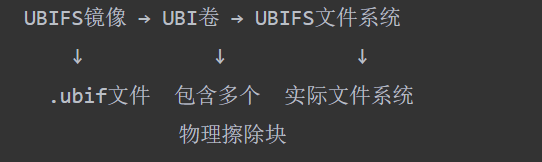
| UBIFS镜像 → UBI卷 → UBIFS文件系统
↓ ↓ ↓
.ubif文件 包含多个 实际文件系统
物理擦除块
|
层次结构
text
1
2
3
4
5
6
7
| Raw Flash
↓
MTD (Memory Technology Device)
↓
UBI (Unsorted Block Images)
↓
UBIFS (File System)
|
处理UBIFS镜像的工具
主要工具集
bash
1
2
3
4
5
6
7
8
| # MTD工具
mtdinfo, flash_erase, nandwrite
# UBI工具
ubinize, ubiformat, ubiattach
# UBIFS工具
mkfs.ubifs, ubirmvol, ubiupdatevol
|
镜像提取和分析步骤
1. 识别镜像类型
bash
1
2
3
4
5
6
| # 检查文件类型
file image.ubifs
hexdump -C image.ubifs | head -20
# 查找UBI魔术字
grep -a "UBI#" image.ubifs
|
2. 提取UBI卷
bash
1
2
3
4
5
6
7
8
9
| # 使用ubinfo查看镜像信息
ubinfo --image image.ubifs
# 挂载UBIFS镜像
sudo modprobe nandsim first_id_byte=0xec second_id_byte=0xa1
sudo modprobe ubi mtd=0
sudo ubiformat /dev/mtd0 -f image.ubifs
sudo ubiattach /dev/ubi_ctrl -m 0
sudo mount -t ubifs ubi0:rootfs /mnt/ubifs
|
3. 直接解析UBIFS(无需硬件)
bash
1
2
3
4
5
| # 使用ubireader提取文件
ubireader_extract_files -i image.ubifs -o extracted_files/
# 使用ubidump分析结构
ubidump image.ubifs
|
使用UBI工具处理
创建UBI镜像
bash
1
2
3
4
5
| # 从目录创建UBIFS镜像
mkfs.ubifs -r rootfs/ -m 2048 -e 126976 -c 1024 -o ubifs.img
# 创建UBI镜像
ubinize -o image.ubifs -m 2048 -p 128KiB ubinize.cfg
|
ubinize配置文件示例
ini
1
2
3
4
5
6
7
8
| [ubifs]
mode=ubi
image=ubifs.img
vol_id=0
vol_size=100MiB
vol_type=dynamic
vol_name=rootfs
vol_flags=autoresize
|
编程方式处理UBIFS
Python处理示例
python
1
2
3
4
5
6
7
8
9
10
11
12
13
14
15
16
17
18
19
20
21
22
23
24
25
26
27
28
29
| import subprocess
import os
def extract_ubifs(image_path, output_dir):
"""提取UBIFS镜像内容"""
if not os.path.exists(output_dir):
os.makedirs(output_dir)
# 使用ubireader_extract_files
cmd = ['ubireader_extract_files', '-i', image_path, '-o', output_dir]
result = subprocess.run(cmd, capture_output=True, text=True)
if result.returncode == 0:
print("UBIFS镜像提取成功")
return True
else:
print(f"提取失败: {result.stderr}")
return False
def analyze_ubifs_structure(image_path):
"""分析UBIFS结构"""
# 读取魔术字和基本信息
with open(image_path, 'rb') as f:
header = f.read(64)
print("镜像头部信息:")
print(f"魔术字: {header[:4]}")
print(f"版本: {header[4:8]}")
print(f"数据偏移: {int.from_bytes(header[8:12], 'little')}")
|
解析UBI头信息
python
1
2
3
4
5
6
7
8
9
10
11
12
13
14
15
16
17
| import struct
def parse_ubi_ec_hdr(data):
"""解析UBI EC头"""
magic = data[0:4]
version = data[4:8]
ec = struct.unpack('<I', data[8:12])[0] # 擦除计数器
vid_hdr_offset = struct.unpack('<I', data[12:16])[0]
data_offset = struct.unpack('<I', data[16:20])[0]
return {
'magic': magic,
'version': version,
'erase_counter': ec,
'vid_hdr_offset': vid_hdr_offset,
'data_offset': data_offset
}
|
在数字取证中的应用
取证分析步骤
bash
1
2
3
4
5
6
7
8
9
10
11
12
| # 1. 创建镜像副本
dd if=/dev/mtd0 of=flash_dump.bin bs=1M
# 2. 分析MTD分区
mtdinfo flash_dump.bin
# 3. 提取UBIFS内容
ubireader_extract_images -i flash_dump.bin -o extracted_volumes/
# 4. 文件系统分析
ls -la extracted_volumes/
find extracted_volumes/ -name "*.conf" -o -name "*.sh"
|
重要数据位置
bash
1
2
3
4
5
6
7
8
9
10
11
12
13
| # 配置文件
/etc/passwd
/etc/shadow
/etc/network/interfaces
# 日志文件
/var/log/messages
/var/log/auth.log
# 用户数据
/home/
/root/
/tmp/
|
常见问题解决
1. 挂载失败
bash
1
2
3
4
5
6
7
| # 错误: UBI device 0 not found
sudo modprobe ubi
sudo ubiattach /dev/ubi_ctrl -m 0 -d 0
# 错误: Invalid argument
# 检查PEB大小是否匹配
ubinfo --image image.ubifs
|
2. 镜像损坏
bash
1
2
3
4
5
| # 尝试修复
ubirepair image.ubifs
# 强制挂载
sudo ubiformat /dev/mtd0 -f image.ubifs -s 2048
|
高级分析技巧
恢复删除文件
bash
1
2
3
4
5
6
| # UBIFS删除文件恢复较难,但可以尝试:
# 1. 扫描原始镜像字符串
strings flash_dump.bin | grep -i "password"
# 2. 分析未分配擦除块
ubireader_display -i image.ubifs
|
时间线分析
bash
1
2
3
4
5
| # 提取文件时间信息
find extracted_volumes/ -type f -exec stat {} \; > timeline.txt
# 分析修改时间
cat timeline.txt | grep "Modify"
|
实际案例
路由器固件分析
bash
1
2
3
4
5
6
7
8
9
| # 下载路由器固件
wget http://example.com/firmware.bin
# 提取UBIFS分区
binwalk -e firmware.bin
# 分析提取的文件
cd _firmware.bin.extracted/
ubireader_extract_files -i *.ubifs -o router_fs/
|
嵌入式设备取证
python
1
2
3
4
5
6
7
8
9
10
11
12
13
14
15
16
17
18
19
20
| # 自动化分析脚本
import os
import hashlib
def analyze_embedded_device(image_path):
"""分析嵌入式设备镜像"""
print("=== UBIFS镜像分析报告 ===")
# 1. 基本信息
size = os.path.getsize(image_path)
print(f"镜像大小: {size} bytes")
# 2. 提取文件
extract_dir = "extracted_fs"
if extract_ubifs(image_path, extract_dir):
# 3. 分析提取的文件
for root, dirs, files in os.walk(extract_dir):
for file in files:
filepath = os.path.join(root, file)
print(f"找到文件: {filepath}")
|
工具安装
Ubuntu/Debian
bash
1
2
| sudo apt update
sudo apt install mtd-utils ubi-utils binwalk
|
CentOS/RHEL
bash
1
2
3
4
| sudo yum install mtd-utils
# 需要从源码编译ubi-utils
git clone https://github.com/oberhumer/ubi-utils
cd ubi-utils && make
|
总结
UBIFS镜像分析关键点:
使用正确的工具链(mtd-utils, ubi-utils)
解层次结构(MTD→UBI→UBIFS)
注意参数匹配(PEB大小、块大小)
备份原始镜像再进行操作
使用ubi_reader(推荐)
bash
安装ubi_reader
sudo apt install python3-pip
pip3 install ubi_reader
提取UBI卷信息
ubinfo –image firmware.ubifs
显示详细结构
ubireader_display -i firmware.ubifs
提取所有文件
ubireader_extract_files -i firmware.ubifs -o extracted_fs/